Embedding WinForms Components in an HTML5 Page
- Dec 20, 2025
- 3 min read
When upgrading a WinForms (or WPF) .NET application with a HTML5 WebUI, it can be useful to render selected WinForms (or WPF) components directly within the HTML5 content, offering a seamless user experience:
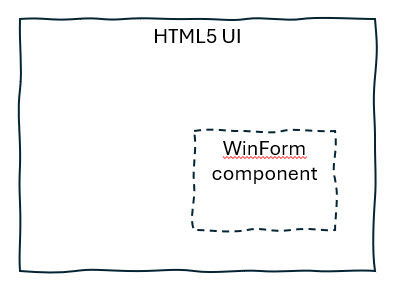
To achieve this, different approaches are possible:
Use the legacy WebBrowser (Internet Explorer) control which is still capable to display ActiveX. However, the long‑term viability is uncertain.
Render the WinForms component on another machine (or a virtual machine) and stream it into an <iframe>. While technically feasible, this approach would require a significantly more complex infrastructure.
Render the HTML5 UI inside a WebView2 component and overlay the native WinForms component on top of it.
This article explores the 3rd option.
TL;DR
(Spoiler): On the JavaScript side, a ResizeObserver sends the coordinates/sizes as JSON to C# via window.chrome.webview.postMessage(). The WinForm component reliably stays on top using BringToFront().
Resulting prototype
A simple HTML5 page has been created with a grid and two cells. The WinForm component (shown in yellow) automatically stays aligned with the 2nd cell:
The integration of both technologies is almost invisible for the user; the focus can be switched between the components by clicking or using the key "tab".
Implementation
The source code is available on GitHub.
The project setup and Visual Studio Code configuration is documented in README.md.
Position synchronization
WebView2 initialization
The WebView2 is initialized and configured in Form1.cs.
await _webView.EnsureCoreWebView2Async();
(...)
_webView.CoreWebView2.Settings.IsWebMessageEnabled = true;
_webView.CoreWebView2.Navigate(htmlPath);
This option "IsWebMessageEnabled" allows the HTML5 page to communicate with C#.
HTML5 Sends Position on Resize
The WinForm component (the yellow one) must keep its position synchronized with the cell in the HTML page. To achieve this we observe the cell in index.html:
const resizeObserver = new ResizeObserver(entries => {
  sendCell2Dimensions();
});

const cell2 = document.getElementById('resizableCell');
resizeObserver.observe(cell2);
Then the function "sendCellDimensions" sends the position to the C# program as a JSON object:
function sendCell2Dimensions() {
    const rect = cell2.getBoundingClientRect();
    const dpr = window.devicePixelRatio; // Gets the DPI scale

    // Send message to C# with physical pixel dimensions
    window.chrome.webview.postMessage({
        action: 'cell2Resized',
        width: rect.width * dpr,
        height: rect.height * dpr,
        x: rect.left * dpr,
        y: rect.top * dpr
    });
}
Note: the position is converted to use absolute pixels as needed by .NET.
WebView2 Updates WinForms Position
The WebView2 component has been previously configured to listen to messages with the following handler:
_webView.CoreWebView2.WebMessageReceived += (sender, args) =>
{
    string message = args.WebMessageAsJson;
    OnCell2Resized(message);
};
Finally, the position is updated in the method OnCell2Resized:
_overlayPanel.Invoke((MethodInvoker)(() =>
{
    (...)
    _overlayPanel.Location = new Point(adjustedX, adjustedY);
    _overlayPanel.Size = new Size(adjustedWidth, adjustedHeight);
}));
Note: the WinForm has been configured always to be displayed on the top:
_overlayPanel.BringToFront();Learnings and limitations
The "pixels" used in HTML5 and C# are not the same: the positions and sizes have to be converted into absolute pixels considering the DPI resolution (this can be done either on the Javascript or .NET side)
To avoid unexpected issues (yes there are...), the scrollbar is disabled in the "body
To keep the size correctly synchronized, observing only the 2nd cell isn’t enough - you also need to track both the initial size on load and any size changes of the HTML5 text area (see all details in index.html).
Conclusions
The result creates a seamless illusion that the WinForm component is fully integrated into the HTML5 page.



Comments