Automate your browser using Playwright MCP server with GitHub Copilot
- Dec 27, 2025
- 3 min read
Updated: Dec 30, 2025
This article demonstrates the usage of MCP servers to automate browser with the help of GitHub Copilot, within Visual Studio Code. This can assist in developing automated end-to-end (E2E) tests including running explorative and even vulnerability tests or in automating workflows.

Installation
Preconditions: Visual Studio Code and node must be installed.
Create a new package, install playwright and the actual browser binaries:
npm init -y
npm install -D @playwright/test
npx playwright install
Configuration of Playwright MCP server
In the command palette, execute "MCP: Add Server...":
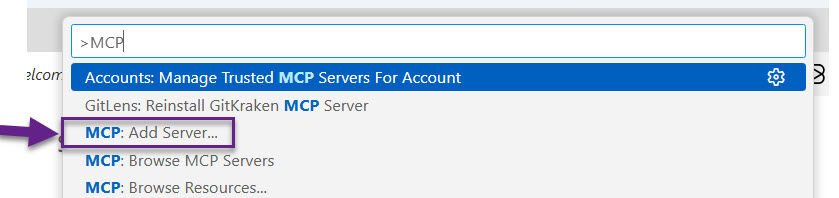
Then, choose the option "Browse MCP Servers..." and the first time "Enable MCP Servers Marketplace":

Select "Playwright" in the list of MCP Servers.

After this step, you can see the "MCP Server" running:

Copilot interacting with Playwright
With the MCP Server running, you can interact directly with Copilot’s chat.
Example:
Open edge browser and goto https://julienmesser.wixsite.com/la-cabane-rouge
Select the language "EN"
Open the article "Embedding Winforms Component
After submitting these instructions, a browser window opens and executes them automatically.

Using Copilot to Generate Playwright Test Scripts
You can also ask Copilot to generate an end‑to‑end test script. For example: "Create a playwright test script to open this page, switch to english and navigate to this article".
The resulting script can be run in interactive mode like this:
npx playwright test --uiSince the technology is not yet mature enough to generate a complete script from the start, the test may fail. In this case, Copilot can assist you in fixing it:

In the tab “Errors”, click Copy prompt, then paste it into Copilot with a request to “fix the errors.” For this example, the correction worked successfully.
Automation of browser workflows
Another possible use of the Playwright MCP server is automating browser‑based workflows. To try this out, we asked Copilot to search for a flight connection on Google Flights (something always useful...).
We used the following prompt: "open google flights in the browser, search for a cheap direct flight Zurich - New York in august 2026 staying ~5 nights". You can see the execution and Copilot’s summary in the video below:
Running explorative tests
Let's check the ability to run explorative tests with the following prompt: "Perform an explorative test of the page "https://google.fr" during 15 minutes: trying to cover the different pages, covering the different input fields. Bring up a report what has been tested, the different finding. Present the visited page as a mermaid graph in a markdown document".
This request unfortunately failed "Reason: Request Failed: 413 Request Entity Too Large", probably due to GitHub Copilot limitations. Finally, the attempt was successful after reducing the test duration to 5 minutes.
The resulting report is comprehensive, includes a flow diagram:

It also points the observed issues, in our case timeout errors and errors on the console.
Running vulnerability tests
The setup has also proven capable to discover vulnerabilities on a page and run vulnerability tests accordingly:
Cross Site Scripting (XSS): Input encoding, Output escaping, Script execution
Content Security Policy (CSP) header
Conclusion
The Playwright MCP server opens up interesting possibilities for browser automation directly through GitHub Copilot. Whether generating test scripts, or automating real‑world workflows, Copilot provides valuable assistance, even if the generated scripts sometimes still require refinement. Our evaluation focused primarily on Playwright, but other options, such as Browser MCP, may offer similar capabilities.


Comments